Key Takeaways:
- Agent Hub brings HubSpot’s pre-built agents, custom agents, workflows, context and activity into one central space
- A Super Admin must enable the relevant AI settings and permissions before teams can start building and using agents.
- Agents consume HubSpot Credits, which means trigger scope, run frequency and expected usage should form part of the planning process.
- Agent Builder allows teams to create custom agents that work with CRM data, internal knowledge and defined business processes.
- Shared context, clean data and clear instructions are essential for reliable agent outputs.
- RevOps plays an important role in coordinating ownership, governance, permissions and measurement.
- Businesses should start with one defined use case, test it carefully and refine the agent before scaling.
|
What is HubSpot Agent Hub and how does it work?
If your business has started using one AI agent for prospecting, another for customer service and a few AI-powered workflows behind the scenes, the next question now becomes:
Who’s keeping track of all of it?
On 23 July 2026, HubSpot launched Agent Hub and Agent Builder in public beta. Existing Professional and Enterprise customers don’t need to purchase Agent Hub separately. It’s included with Marketing Hub, Sales Hub, Service Hub, Data Hub, Content Hub and Smart CRM at those tiers. Running agents uses HubSpot Credits, so access is included, but usage still needs to be planned. Together, Agent Hub and Agent Builder provide one place to view, manage, build and improve the AI agents working across HubSpot.
Agent Hub doesn’t replace Breeze. Breeze remains HubSpot’s broader AI layer, including Breeze Assistant, Breeze Agents and AI-powered features. Agent Hub provides the central workspace for viewing, building and managing those agents and agentic workflows. It gives businesses a clearer view of what their agents are doing, which customer information they’re using and where AI is supporting the customer journey.
Here’s what Agent Hub includes and what businesses should consider before putting it to work.
| Beta update: Agent Hub and Agent Builder are currently in public beta for HubSpot Professional and Enterprise customers. Features, availability and credit requirements may continue to change as HubSpot develops the platform. |
Watch: A first look at HubSpot Agent Hub
Kyle Jepson walks through the Agent Hub overview, Agent Builder, workflows, context and Agent Inbox.
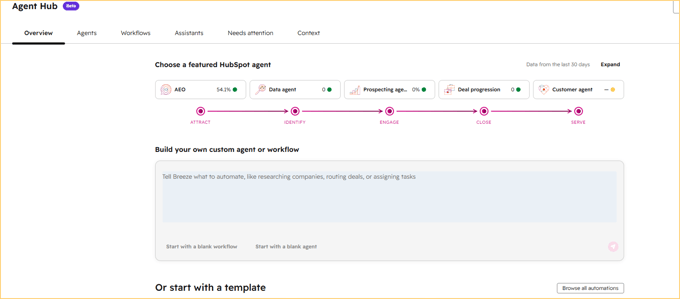 Agent Hub brings featured agents, custom agent creation and AI workflows into one central workspace. Source: HubSpot portal screenshot.
What is HubSpot Agent Hub?
Agent Hub is the central home for managing AI agents across HubSpot.

From one space, teams can:
- See which agents are active
- Review their status and performance
- Find agents that haven’t been activated yet
- Access the Agent Marketplace
- Build custom agents and automations
- Manage the context agents use
- Review completed agent activity
HubSpot organises agent outcomes around common go-to-market goals, including generating demand, winning deals, supporting customers and scaling growth.
|
💡 What does “agentic” mean?
Agentic AI can work towards a goal by deciding which steps, tools and information it needs, rather than waiting for someone to prompt every individual action.
|
Why has HubSpot introduced Agent Hub?
Using one agent is relatively straightforward. Things become more complicated when different teams begin activating several agents, each with its own purpose, instructions and access to customer information.
Imagine a prospecting agent contacting an account while the customer service team is handling an unresolved complaint from the same business. Without shared context, those agents may take actions that make sense within their individual tasks but create a confusing customer experience.
HubSpot identified this fragmentation as one of the main reasons for launching Agent Hub. Businesses need a way to see what their agents are doing and ensure they’re working from a consistent view of the customer.
That’s where the new hub becomes especially relevant for RevOps.
What can you do in Agent Hub?
See where agents are already working
Agent Hub provides a high-level view of the agents available across HubSpot.
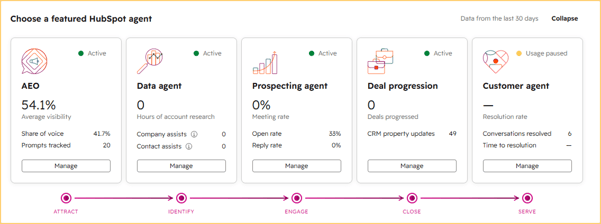 The Agent Hub dashboard shows which HubSpot agents are active and how they’re contributing across marketing, sales and customer service.
Active agents display their current status and performance, while inactive agents show opportunities the business hasn’t explored yet. Teams can then open an existing agent, review its activity or activate an additional one.
This can help businesses move beyond broad statements such as “we’re using AI” and identify exactly where AI is contributing.
For example, your sales team may already use Prospecting Agent for research and outreach, while customer service still handles every common query manually. Agent Hub makes that gap more visible.
Explore HubSpot’s pre-built agents and AI capabilities
HubSpot already offers several agents and AI capabilities that support different stages of the customer journey.
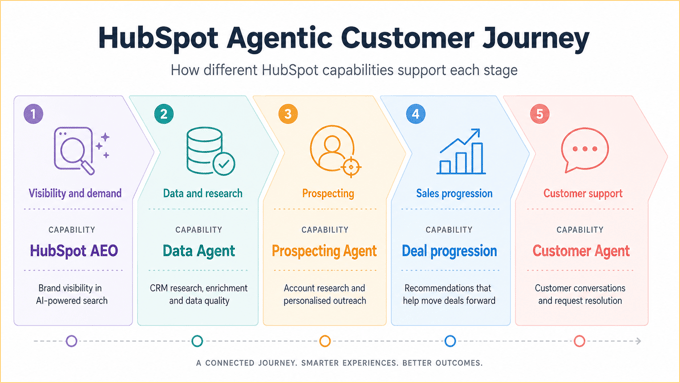 HubSpot’s agents and AI capabilities support different stages of the customer journey, from generating demand to resolving customer queries.
Prospecting Agent:
- Researches target accounts using CRM information and buying signals.
- Helps create personalised outreach and contextual sales emails.
- Reduces the time salespeople spend on account research and first-touch communication.
- Gives sales teams more time to focus on conversations, qualification and progressing opportunities.
- HubSpot reports that customers using Prospecting Agent booked 80% more meetings than comparable customers who weren’t using it, based on Professional and Enterprise customer activity measured between March and April 2026.
Customer Agent:
- Responds to routine customer questions using approved business content, previous conversations and available customer information.
- Provides support outside normal working hours.
- Passes more complex queries to a human team member when needed.
- HubSpot reported in June 2026 that businesses using Customer Agent had 2.3 times the support conversation resolution rate of comparable customers who weren’t using it.
- The comparison was based on Professional and Enterprise customer activity measured between February and March 2026.
Data Agent:
- Researches, analyses and answers questions about customer and company information.
- Uses CRM records, call transcripts, emails and other available sources.
- Helps teams prepare for meetings, enrich records and find relevant information more quickly.
- Can summarise recent account activity, identify known challenges and highlight gaps in a contact record before a sales call.
HubSpot AEO:
- Helps marketers understand how their brands appear in AI-generated search results.
- Tracks brand visibility across answer engines.
- Identifies topics associated with the brand and potential content gaps.
- Supports visibility as buyers increasingly use tools such as ChatGPT, Gemini and Perplexity to research products, compare providers and ask industry-specific questions.
AI-Powered deal progression:
- Reviews deal activity and highlights relevant signals, risks and suggested next actions.
- Helps sales teams maintain more consistent follow-up.
- Makes it easier to identify deals that need attention.
- Reduces reliance on manual pipeline checks.
Build custom agents with Agent Builder
HubSpot’s pre-built agents won’t cover every process. This is where Agent Builder comes in.
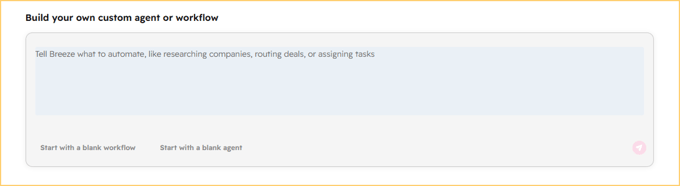 Agent Builder allows teams to describe the process they want to automate and create a custom agent or workflow.
Agent Builder allows teams to create custom agents using natural-language instructions. Each agent is built around four core components:
- Instructions: What the agent should do, how it should approach the task and what its output should look like.
- Actions: The tools and tasks the agent is allowed to use or complete.
- Knowledge: The standing business context available every time the agent runs, such as internal guidance, brand information or a knowledge vault.
- Inputs: The specific information provided for that individual run, such as a deal record, company or customer query.
The distinction between Knowledge and Inputs is especially important. Knowledge stays available across runs, while Inputs change depending on the task the agent is completing.
Because Agent Builder is built into HubSpot, custom agents can work with information already stored in the platform, including:
- Contact and company records
- Deal history
- Call transcripts
- Customer interactions
- Buying signals
- Internal documents
- Workflow triggers
This lowers the technical barrier to building an agent, although the process still requires careful planning. Teams need to define the task, confirm the correct data sources, decide what the agent may change and establish where human approval is needed.
A custom agent could:
- Prepare an account summary before a sales meeting
- Review a deal and recommend the next action
- Check whether required CRM properties are complete
- Research a company when a new deal is created
- Summarise customer history before a renewal conversation
- Draft a follow-up based on a recorded sales call
- Flag records that don’t follow an agreed process
HubSpot shared the example of Ignite Reading, which created an agent to find and interpret school district calendars using information stored on deal records. A task that previously took between 15 and 20 minutes per district could be completed in seconds, with a projected saving of more than 350 hours per year.
Connect agents to HubSpot workflows
The Agent Hub workflow builder goes beyond the classic HubSpot workflow setup. Teams can now place agents, standard workflow actions and third-party app actions on the same visual canvas, then connect the agent’s output to the next step in the process.
Workflows can start from activity inside HubSpot or external events, including Slack messages and webhook triggers. They can also carry out actions in connected tools, such as adding data to Google Sheets or creating tasks in external project management platforms.
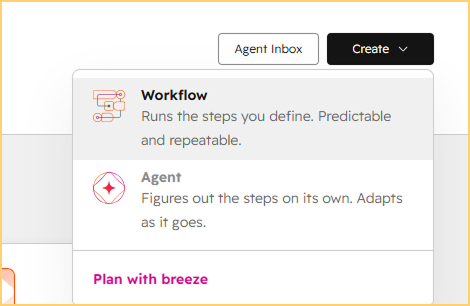 Workflows follow predefined steps, while agents can adapt their approach as they complete a task.
MCP connections extend this further by allowing Breeze Agents to access live information and take action across supported external systems.
For example, when a deal reaches the proposal stage, or a sales manager flags it in Slack, a workflow could ask an agent to:
- Review the deal history.
- Identify missing information.
- Create an account summary.
- Recommend the next action.
- Create a task in HubSpot, Asana or Jira for the relevant owner.
This brings agent-led analysis and structured automation into one connected process, instead of treating them as separate tools.
Give agents the right business context
One of Agent Hub’s most valuable features is its focus on shared context.
HubSpot separates this information into two main areas:
- Business context: Foundational information such as your company details, customer profile, brand positioning, products, services and communication preferences
- Knowledge vaults: Collections of information added for specific use cases, such as product documents, service procedures, campaign records or internal guidance
HubSpot can apply business context across several AI tools, while knowledge vaults provide more focused information to individual assistants and agents.
This context is what helps an agent produce an answer that reflects how your business actually operates.
A prospecting agent needs to understand your ideal customer profile and sales approach. A customer service agent needs current product and escalation information. An agent preparing renewal conversations should understand customer goals, previous commitments and account history.
Without that information, even a well-designed agent may produce generic or irrelevant results.
Review agent activity in the Agent Inbox
Agent Hub also includes an Agent Inbox where teams can review agent runs and outputs.

This gives users a place to inspect what an agent completed, review its results and identify activity that may need further attention.
That visibility matters because custom agents will rarely be perfect from the first run.
Teams may need to adjust:
- The agent’s instructions
- The information it can access
- The trigger that starts the process
- The format of its output
- The point at which a human reviews or approves an action
The Agent Inbox helps businesses treat agent setup as an ongoing improvement process rather than a once-off configuration.
Find additional agents in the Agent Marketplace
Agent Hub also connects users to the Agent Marketplace.
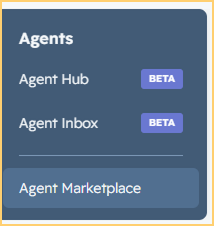
Businesses can browse available agents and install suitable options into their HubSpot accounts. Once installed, these agents can be configured and connected to the appropriate business context.
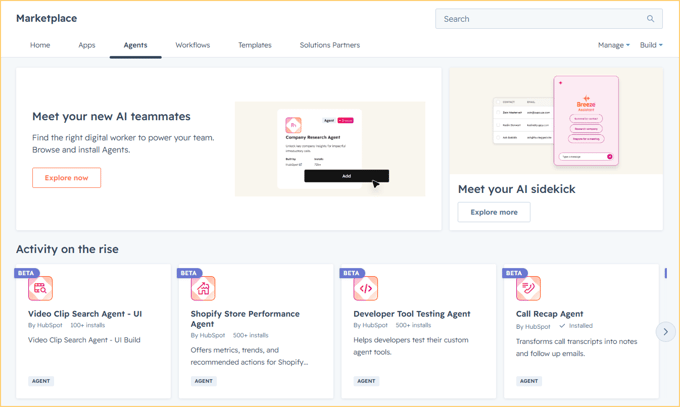 Businesses can explore pre-built agents in the Agent Marketplace instead of creating every agent from scratch.
Marketplace agents can give teams a useful starting point when they don’t need to build from scratch.
They’ll still need to be reviewed against the business’s processes, data and governance requirements. An installed agent won’t automatically understand your pipeline definitions, customer promises or approval steps.
How do HubSpot Credits work with Agent Hub?
Agent Hub and Agent Builder are available to Professional and Enterprise customers, but using certain agents and AI-powered actions requires HubSpot Credits.
Credit use varies depending on the agent, the task it completes and the volume of activity. HubSpot provides tools for monitoring usage and setting limits, helping businesses manage how credits are used across their portals.
Before activating an agent, teams should consider:
- How often the agent is likely to run
- Which actions will consume credits
- Whether the outcome justifies the expected usage
- How credit consumption will be monitored
- Whether limits should be set during testing
As Agent Hub is still in public beta, credit requirements and usage models may continue to change. Businesses should review the latest information in their HubSpot portals before rolling out agents at scale.
Why Agent Hub matters for RevOps
Agent Hub gives businesses the technology to coordinate their AI agents.
RevOps can help define the process, confirm the required data, set permissions and approval points, and decide how success will be measured.
These decisions become especially important when agents operate across marketing, sales and customer service.
A well-executed RevOps strategy creates the shared context AI needs. It connects customer data, lifecycle stages, team activity, process history, ownership and performance measures across the revenue journey.
Agent Hub can then use that foundation to support more coordinated activity.
What should you consider before activating agents?
The ability to activate or build an agent quickly doesn’t mean every process is ready for one.
1. Begin with a defined use case
Choose a task with a clear trigger, owner, input and expected result.
“Help the sales team save time” leaves too much room for interpretation.
“Prepare an account summary when a deal enters the proposal stage” gives the agent a focused purpose.
2. Check the CRM data first
An agent working with incomplete, duplicated or outdated CRM records will produce less reliable results.
Review the properties, associations, records and activities involved in the process before automating it.
3. Set permissions carefully
Control who can build, edit and run agents. Access should also reflect the CRM records and HubSpot tools each agent needs to complete its task.
HubSpot recommends limiting access to credit-consuming AI features until the business has established an appropriate AI strategy.
4. Decide where people remain involved
Some use cases are suitable for independent agent activity. Others should include a review or approval step.
Communication with sensitive accounts, large-scale CRM changes and actions that could affect revenue or customer relationships may need closer human oversight.
5. Monitor the outcome
Measure the process before and after introducing the agent.
Depending on the use case, you could track:
- Time saved
- Lead response time
- Meeting bookings
- CRM completion
- Ticket resolution
- Deal progression
- Follow-up consistency
- Credit usage per completed outcome
An agent is useful when it improves a meaningful result, not only when it produces more activity.
A practical way to start using Agent Hub
Start with one repetitive process that already works reasonably well. Confirm the information the agent needs, define its instructions and choose a measurable outcome.
Run a controlled pilot, review the results in the Agent Inbox and refine the setup before connecting it to a wider workflow or expanding its role.
Once the process is reliable, you can consider connecting it to a workflow or expanding the agent’s role.
This approach gives your team room to learn how Agent Hub works without introducing several agents across the business at once.
Agent Hub raises a bigger operational question
As agents take on more research, administration and decision support, businesses will need to decide where they genuinely add value and where human judgement still matters most.
The real value will come from choosing agents carefully and using them where they can remove friction, improve customer interactions and free teams to focus on work that needs human judgement.
Agent Hub gives businesses the space to build and manage that capability. The next challenge is designing an agent strategy that strengthens how the whole revenue team works.
Ready to identify where AI agents could create the most value in your HubSpot portal?
As a HubSpot Elite Partner with dedicated AI expertise, we can help you assess suitable use cases, prepare your portal and turn Agent Hub into a practical part of your wider AI enablement strategy.
Talk to our experts about HubSpot Agent Hub.