HubSpot continues to redefine what a unified customer platform should look like. Built to power connected teams across marketing, sales, service, operations, and commerce, it brings together data, AI, and automation in one place so businesses can move faster and grow smarter.
Another thing that makes HubSpot a great tool is that they listen to their community, rolling out monthly updates that enhance the platform, address user needs, and keep everyone connected.
Each month, we select our top updates and share our insights and use cases. These are the features we believe will have the biggest impact as you set priorities, refine processes, and build momentum for the year ahead.
Scroll to the end to review the import additional update on Service Keys!
Here are our favourite HubSpot Product Updates for February 2026:
1. Trigger automations from Marketing campaigns
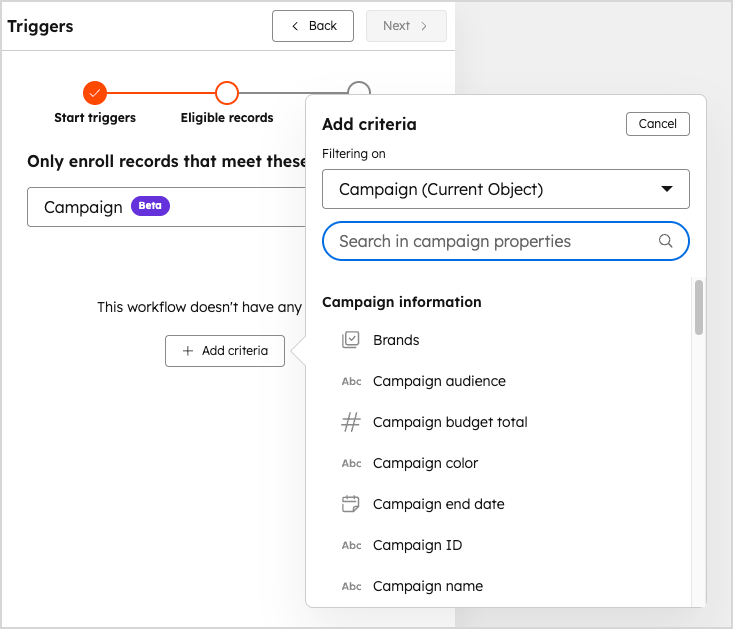
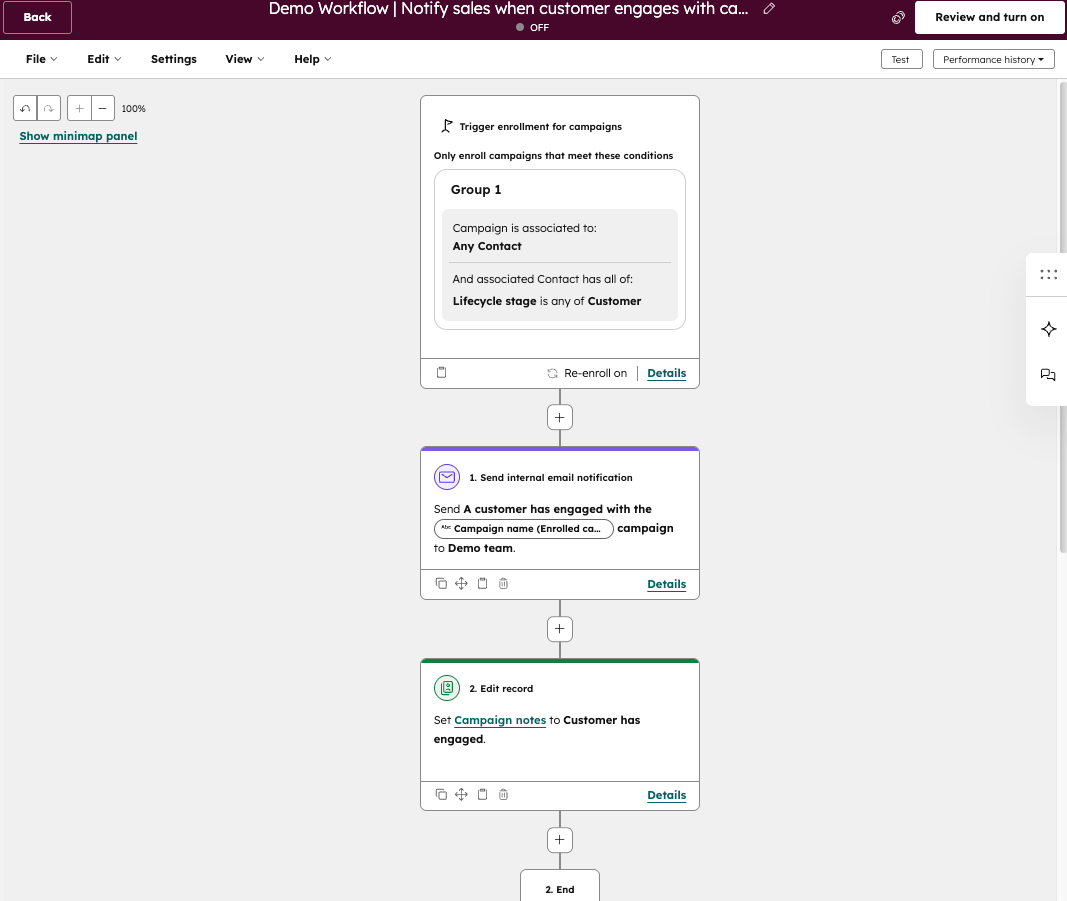
We all know that campaigns are where strategy meets spend, and when your teams are investing time and budget into driving results, campaign data is gold. Being able to automate what happens next is just as important as launching the campaign itself. With this new update, you can now build workflows using campaign properties and influenced contact events, allowing you to build automation driven by campaign specific data.
Use case: Imagine your team is running a product launch campaign and your account managers want to get notified when an existing customer engages with the campaign. Previously, someone would need to manually update campaign records, notify contact owners, and track performance shifts. Now you can automatically update campaign properties based on influenced contact activity, notify the campaign owner or contact owner in real time, and assign follow up tasks the moment engagement happens, keeping everyone aligned without the manual admin.
Available in: Marketing hub professional and enterprise
2. Adding Never Log for meetings
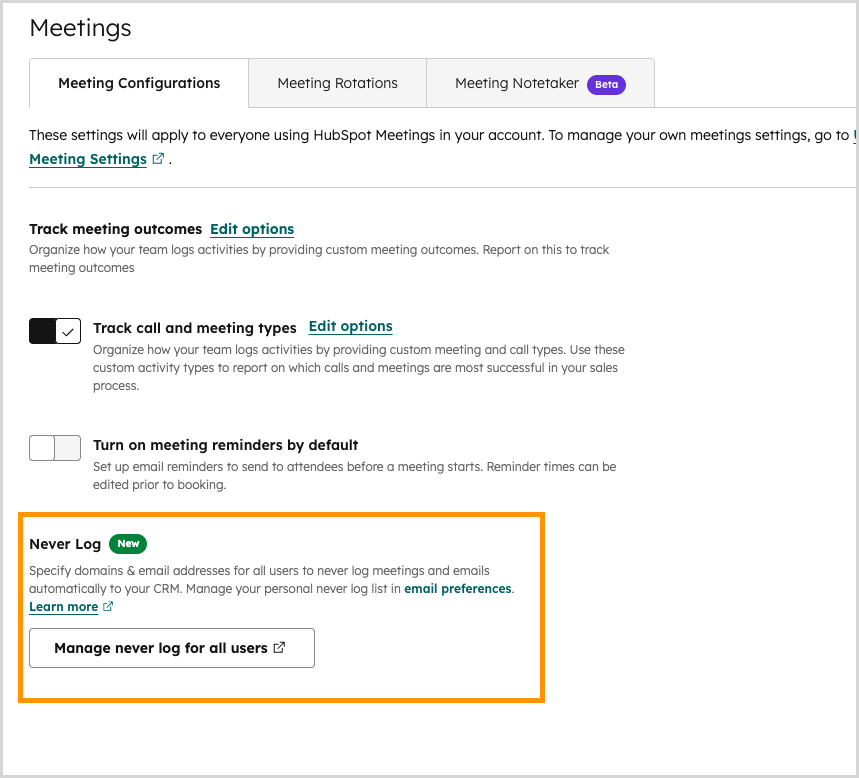
We all know that data hygiene can be a chore and when your teams use all the amazing features in HubSpot that track their activity, being able to exclude data is just as important as including it. With this new update, you can now add an additional layer of data hygiene by ensuring your team are not logging meetings booked with people on their Never Log list.
Use case: Imagine your account manager is asked to book a training session with their POC and all 20 secretaries at your client’s company to show them how your product works, previously, if you wanted to log that meeting it would create all 20 contacts. Now you can exclude contacts and still log that meeting activity.
Available in: All hubs and tiers
3. Introducing Account Service Keys
Service Keys introduce a simplified way to authenticate system to system integrations with HubSpot. They are designed for teams who need secure API access without building and managing a full app on the developer platform. Service Keys are built on HubSpot’s modern infrastructure and are the forward looking replacement for legacy private apps used purely for credential based access. Legacy private apps will continue to be supported for the foreseeable future. However, they will not receive further enhancements. For straightforward API access, they remain perfectly serviceable. For new integrations, Service Keys are the recommended path.
Use case: Imagine your RevOps team uses middleware such as Boomi to sync contacts and deals between HubSpot and an ERP system every night. Historically, this connection relied on a private app access token pasted into Boomi. With Service Keys, the team can generate a dedicated account level credential specifically for this system to system sync. There is no need to build a full app or configure OAuth if the integration is simply making scheduled API calls. The result is a cleaner setup, clearer governance, and a future ready authentication model. If the integration requires more advanced functionality, such as webhooks or app extensions, then a project based app within HubSpot’s developer framework would still be required. Service Keys are best suited to polling based, batch, or ETL style integrations where a secure credential is all that is needed.
Available in: All hubs and tiers using API based system to system integrations as well as Developer Platform accounts.
Have you migrated any of your legacy apps yet? Click here for more information.
What’s gone live?
Features don’t stay in Beta forever, and sometimes an update is small enough that it goes live quickly. Here’s the list of features that have gone live you may have missed:
1. New calculated properties
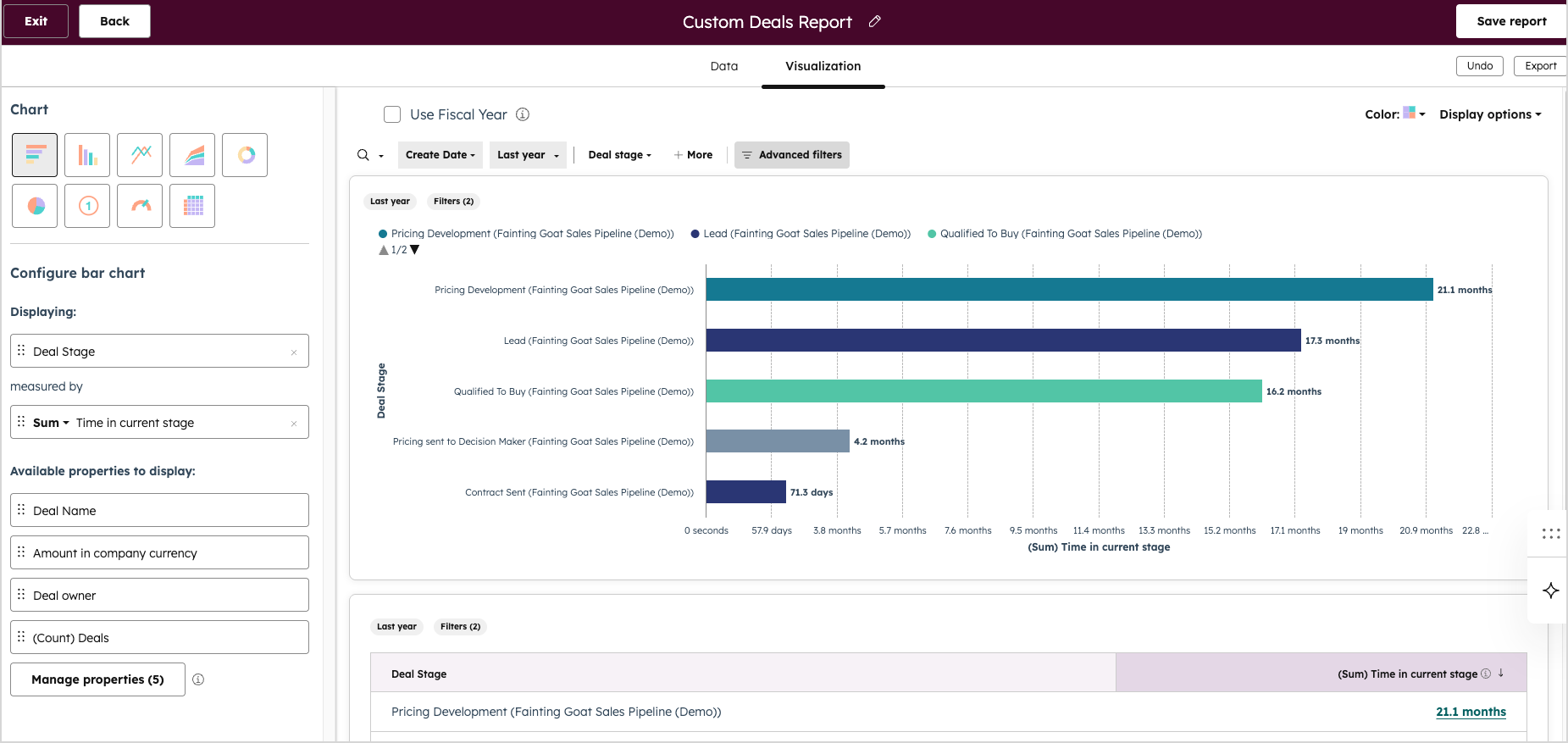
Calculated properties give you the ability to use your data in a more robust way. While you can create custom calculated properties, HubSpot also includes standard calculation properties to help you understand your processes. This update includes 2 new properties - Time in Current Stage and Date Entered Current Stage.
Use case: Imagine your support team wants to ensure no ticket lingers in an Escalated stage longer than five days. By using the new Time in Current Stage and Date Entered Current Stage properties for tickets, they can instantly see how long each case has been sitting there and when it moved into that stage. The team could create filtered views to highlight ageing tickets, or a report that allows them to find patterns in response times across the team.
Available in: All hubs professional and enterprise tier
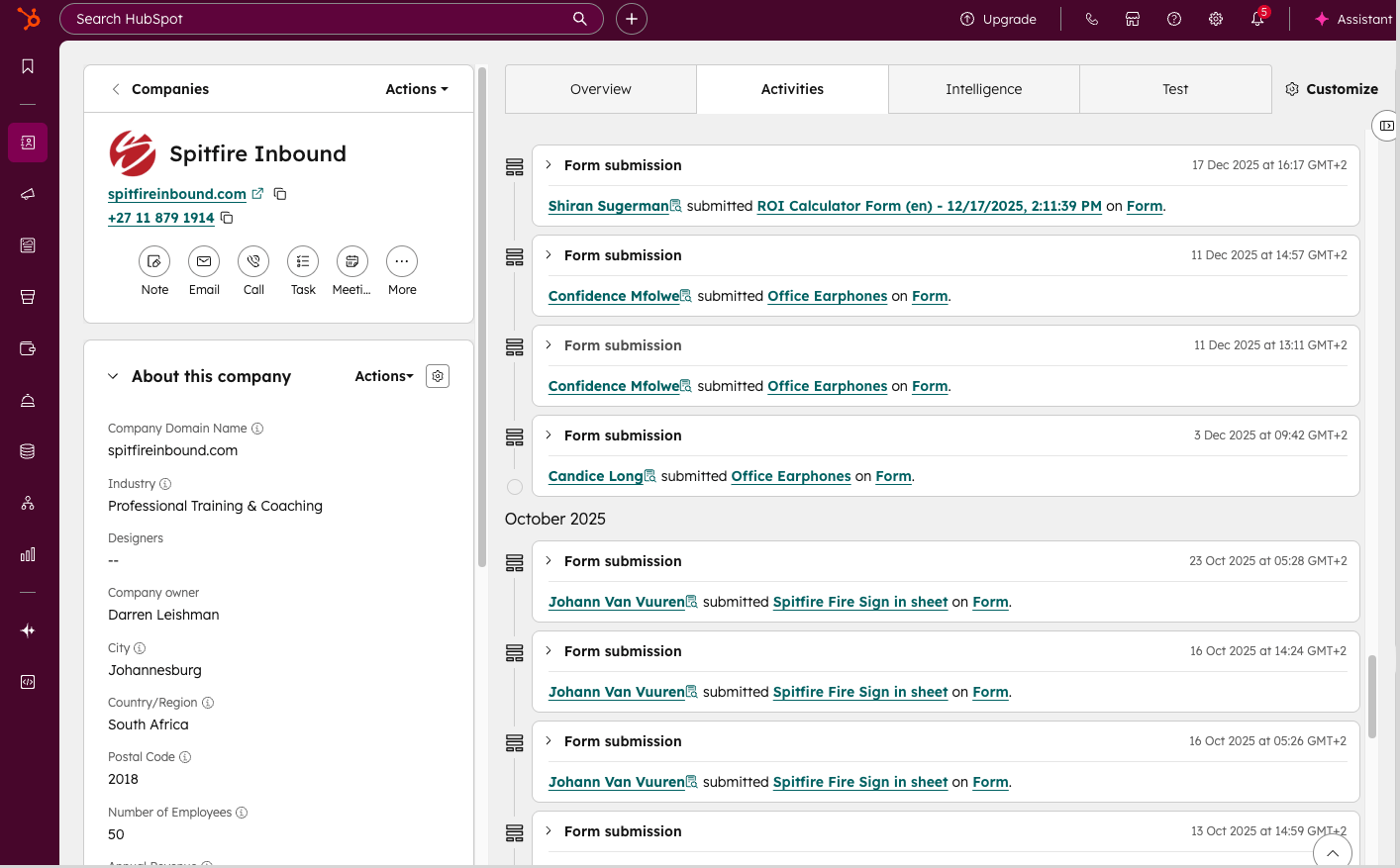
2. Form submissions visibility on company records
Form submissions are a fundamental data point for any engagement on your CRM. When you’re reviewing activity for a company, you want to be able to see all the people at that company who have filled in a form on the same record timeline. Now this is possible.
Use case: You have a company in your CRM who has several branches that each engage with your team by filling in a form. You can now go to the company record and filter by form submissions to see all this data easily and engage from a single record rather than having to jump between contact records.
Available in: All hubs and tiers
3. Rich Text Editor for Welcome Messages in Custom Assistants
This update brings proper formatting tools into the process of building Custom Assistants in Breeze Studio. Instead of being limited to a single plain text field, you can now craft structured, polished welcome messages using bold, italics, lists, links and emojis, complete with a live preview so you can see exactly how your message will appear before publishing.
Use case: You are launching a Custom Assistant to support customers. With the rich text editor, you can clearly outline what the assistant can help with using bullet points, highlight key instructions in bold, and include direct links to relevant documentation. You can also add guidance on what information users should and should not share, supporting data privacy and security efforts. For example, you might clearly state not to include sensitive personal data such as PII. If the assistant represents your brand, you can reflect your tone and personality in a more creative and engaging way than a single line of plain text ever allowed. In many cases, you can even answer common questions upfront by linking to helpful resources, meaning users get what they need without having to ask.
Available in: All hubs and tiers
Our Head of AI, Brandon Holz has this to say about this update.
“This update gives you the opportunity to provide clarity and reduce ambiguity up front because you can generate welcome messages that are much easier to understand and dissect.”
How to access Beta updates
Like we said, HubSpot loves to listen to its users, so not all updates are immediately live. Many start off in Beta where you have the opportunity to test and comment on these changes.
If you don’t see the update in your portal, you can enrol in the Beta. This is an easy and quick step to do. Take a look at the step-by-step process below for instructions:
Good to know: While the majority of features in Beta do go live, HubSpot doesn’t guarantee that every Beta will go live and may still be removed.
Want to become a HubSpot pro? Join the Advanced HubSpot User Group and get invites to hands-on workshops, practical deep dives, and fresh perspectives designed to take you from confident to seriously advanced in HubSpot.
What to find out how you can get the most out of your HubSpot portal? Contact us for a portal audit, or explore our HubSpot Onboarding services.